Download
Download Win11Debloat 2026.08.24
There are two official ways to get Win11Debloat, and both come from Raphire's GitHub repository. You can run the one-line launcher, or download the release ZIP. There is no installer, no .exe and no app store package.
On this page 9 sections
Short answer
Where do I download Win11Debloat?
- Latest version: 2026.08.24, released August 24, 2026.
- Quickest: paste
& ([scriptblock]::Create((irm "https://debloat.raphi.re/")))into PowerShell. It always fetches the latest release. - Manual: on the GitHub releases page, open Assets and download Source code (zip). Extract it and run
Run.bat. - Avoid:
.exeversions, download portals that repackage it, and re-uploads under other GitHub accounts.
The latest release
- Version
- 2026.08.24. The project names versions by release date (year.month.day).
- Released
- August 24, 2026. That is 30 releases since September 2025, about one every 12 days.
- Commit
f431c56on themasterbranch- License
- MIT. Free for personal and commercial use.
- Size
- About 470 KB zipped, 403 files. Most of them are small
.regfiles, one per tweak. - Runs on
- Windows 11 and Windows 10, using the Windows PowerShell 5.1 that comes with Windows. You need an administrator account. Nothing else to install.
- Launcher downloads
- 641,535 downloads of
Get.ps1for this release, as of October 30, 2026. That file is only fetched by the one-liner, so this is a lower bound on use.
Which download method to use
| One-line launcher | Release ZIP + Run.bat | ZIP + PowerShell | |
|---|---|---|---|
| Best for | Most people | People who prefer not to paste commands | Power users, scripts, offline PCs |
| Always the latest version | Yes | No, the version you downloaded | No, the version you downloaded |
| Read the files before running | No | Yes | Yes |
| Command-line switches | Yes, appended to the command | No | Yes |
| Needs internet | Yes | Only to download | Only to download |
| Files left on disk | Only Config, Logs and Backups in %TEMP%\Win11Debloat | The folder you extracted | The folder you extracted |
Method 1: the one-line launcher
Open Windows PowerShell or Terminal. Running it as administrator is optional, because the launcher asks for elevation itself. Paste this command and press Enter:
& ([scriptblock]::Create((irm "https://debloat.raphi.re/")))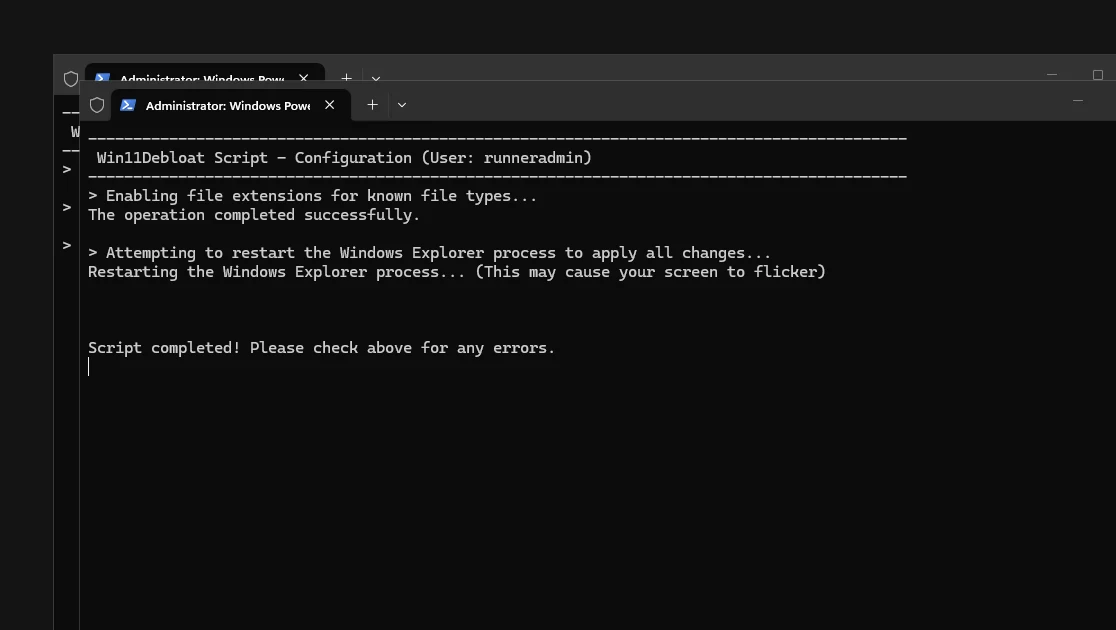
Get.ps1 has downloaded the release to %TEMP%\win11debloat.zip and is unpacking it before Win11Debloat starts.Here is what that one line does, step by step. We read the launcher's code (Get.ps1 from 2026.08.24) and watched the network on our test machine to confirm it.
- You run the commandirm "https://debloat.raphi.re/"
irmisInvoke-RestMethod. It downloads text, and[scriptblock]::Create(…)runs that text as a script. - debloat.raphi.re redirects to GitHub301 → github.com/Raphire/Win11Debloat/releases/latest/download/Get.ps1The short domain belongs to the project. It is served by Cloudflare and only points to the
Get.ps1file attached to the latest release. - Get.ps1 asks GitHub for the latest releaseapi.github.com/repos/Raphire/Win11Debloat/releases/latestIt reads the release's source archive address. With
-Dev, it takes the unreleasedmasterbranch instead. - It downloads and unpacks the release%TEMP%\win11debloat.zip → %TEMP%\Win11DebloatLeftover files from an earlier run are deleted first.
LastUsedSettings.json, logs and registry backups are kept. - It starts Win11Debloat as administratorpowershell -ExecutionPolicy Bypass -File Win11Debloat.ps1 -Verb RunAsWindows shows a UAC prompt. Any switches you added to the one-liner are passed on. The launcher window minimizes and waits.
- When you close Win11Debloat, it cleans upkeeps Config, Logs, BackupsEverything else in
%TEMP%\Win11Debloatis removed. Your registry backups stay there in case you need to undo.
To pass options, add them after the command. For example, this applies Default mode without any questions:
& ([scriptblock]::Create((irm "https://debloat.raphi.re/"))) -RunDefaults -SilentMethod 2: the release ZIP
Open the latest release on GitHub
Go to github.com/Raphire/Win11Debloat/releases/latest. The release page shows 2026.08.24 and its changelog.
Download “Source code (zip)”
Scroll to Assets and click Source code (zip). The only file uploaded to the release is
Get.ps1, which is the launcher, so the source code ZIP is the full script.Extract it
Right-click the ZIP and choose Extract All. You get a folder named like
Raphire-Win11Debloat-f431c56orWin11Debloat-2026.08.24. A short path such asC:\Win11Debloatavoids path-length and permission problems.Run Run.bat
Double-click
Run.batand accept the UAC prompt. It opens Win11Debloat in Windows Terminal if you have it, and in Windows PowerShell otherwise. If the window flashes and closes, startWin11Debloat.ps1from PowerShell instead (method 3).
Method 3: run the downloaded script from PowerShell
Use this method for command-line switches, for scripts, or when Run.bat does nothing. Open PowerShell as administrator, then:
Set-ExecutionPolicy Bypass -Scope Process -Force
cd C:\Win11Debloat
.\Win11Debloat.ps1
-Scope Process allows scripts only in this one PowerShell window. Your system's execution policy is not changed. The how-to-use guide walks through every screen after this point.
Check that your copy is genuine
Win11Debloat is not code-signed: Win11Debloat.ps1 has no signature block. You check it by where it came from and by its hash. These are the SHA-256 hashes of the official files for 2026.08.24. We computed them on Windows, on the files the launcher really downloaded:
| File | SHA-256 (computed with Get-FileHash on Windows) |
|---|---|
| LauncherGet.ps1 via debloat.raphi.re | 3318C215F8347F4A37282D78E4EFD078284CC3D575D0510EE5E4119F4685378E9,071 bytes. Attached to release 2026.08.24.Identical on all 7 test machines. |
| Main scriptWin11Debloat.ps1 in 2026.08.24 | 1ACE81FC73C227F403D8F20A86D7EB0FA7F34985A017379BF141E04941D2CAADThe file that does the work. Compare this one: it is the same whichever way you download.Identical on all 7 test machines. |
| Release archivezipball of 2026.08.24 | 01CB9B2DF59E5D32BA273198529845BECED6DC447D1C604B139B4EFE69A2AAAD466,563 bytes, 403 files. GitHub builds this archive on the fly, so its hash can change even when the files inside do not.Identical on all 7 test machines. |
To check your own copy, run this in the extracted folder and compare the result with the table:
Get-FileHash .\Win11Debloat.ps1 -Algorithm SHA256Copies to avoid
Win11Debloat's popularity attracts look-alikes. None of the following are official. We are not saying they are malicious, only that you cannot check them against the source.
- Anything ending in
.exe. The project has never shipped an executable. A "Win11Debloat.exe" was built by someone else. - Re-uploads under other GitHub accounts. Forks are normal on GitHub, but several copies rank in search results. Before you download, check that the address bar says
github.com/Raphire/Win11Debloat. - Download portals and "free download" pages that host their own copy of the ZIP. They lag behind the twice-monthly releases and may bundle installers.
- Translated or "CN" builds on Gitee or GitCode, which people search for as
win11debloat-cn,win11debloatcn-v2orwin10debloat-cn. Whatever the name, these are unofficial. The official script is adding its own translations, with 13 interface languages, Chinese among them, coming in the next release. Check any copy against the SHA-256 hashes above. - One-liners that do not use
debloat.raphi.re. A copied command pointing to another domain runs whatever that domain serves. - A different tool called "Windows Toolbox", which Neowin reported as containing malicious files. It is unrelated to Win11Debloat.
Will it run on my PC?
| System | Works? | Notes |
|---|---|---|
| Windows 11 24H2, 25H2 | Yes | The main target. Every tweak is available. |
| Windows 11 21H2–23H2 | Yes | The wizard and Default mode skip tweaks that need a newer build. 52 of 95 tweaks have a minimum build. |
| Windows 10 (22H2) | Yes | Windows 11-only tweaks are skipped. A few app removals report harmless "not found" errors. Windows 10 notes. |
| Windows on Arm (Snapdragon) | Yes | It is PowerShell, so the processor does not matter. We ran it on GitHub's Windows 11 Arm64 machine. |
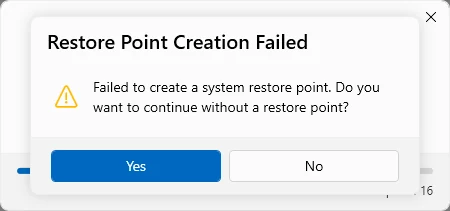
| Windows Server 2025 | Runs, with one catch | Windows Server has no System Restore. Win11Debloat asks whether to continue without a restore point, and answering No cancels the whole run. We saw this in our test. |
| PowerShell 7 | Launcher yes | The launcher works from PowerShell 7, but it always starts the script in Windows PowerShell 5.1, which Win11Debloat needs. |
| macOS, Linux, Android | No | Win11Debloat only changes Windows. |
Download questions
Is Win11Debloat on winget, Scoop, Chocolatey or the Microsoft Store?
No. As of October 30, 2026, there is no Win11Debloat package in winget, the Scoop extras bucket or Chocolatey, and none in the Microsoft Store. A package that appears under that name was not published by the project.
What is debloat.raphi.re?
It is the project's own short address for the launcher. It redirects with HTTP 301 to github.com/Raphire/Win11Debloat/releases/latest/download/Get.ps1, so you always get the launcher from the latest release.
Do I have to download it again every time?
With the one-liner, yes. It downloads the latest release on every run, then deletes the script files when you close it, so you are always up to date. With the ZIP, you keep your copy until you download a newer one.
Can I run Win11Debloat offline?
Yes, with the ZIP. Download and extract it on any PC, copy the folder over, and run Run.bat or Win11Debloat.ps1. The one-liner needs internet because it downloads the script.
Where does the one-liner put the files?
The download goes to %TEMP%\win11debloat.zip and is unpacked to %TEMP%\Win11Debloat, which is usually C:\Users\<you>\AppData\Local\Temp\Win11Debloat. After the run, only Config, Logs and Backups remain.
How do I get the newest, unreleased version?
Add -Dev to the one-liner. The launcher then downloads the master branch instead of the latest release. Development versions are not tested as a release, so use them only when you need a specific fix.
Keep going
Something wrong or out of date? Email hello@win11debloat.dev and we will fix it.